
A few years ago, I would have laughed if you told me I’d make money on kids’ YouTube. I’m not an animator. I’m not a teacher. I don’t even have a fancy camera. What I did have was a laptop, a stubborn streak, and a new AI assistant called Claude that turned out to be the best creative partner I never had to pay a salary.
This article is the honest version of that story: what worked, what flopped, and what I’d do differently. If you’ve wondered whether a kids’ channel is a real business or just a rumor, keep reading. And if you’re a parent or creator who cares about doing this responsibly, you’re in the right place, because that’s the only way it lasts.
1. Why Kids’ YouTube Is Still a Real Way to Make Money
Kids watch a lot of video
Walk into any living room with a toddler and a tablet, and you’ll see it. Kids rewatch the same song or story dozens of times. For a creator, that repeat viewing is gold, because watch time is the currency YouTube pays attention to.
Parents are hungry for good content
Here’s the twist most people miss. Parents are tired of noisy, shallow videos. They want content that’s calm, useful, and actually teaches something. That gap is your opportunity.
The honest catch
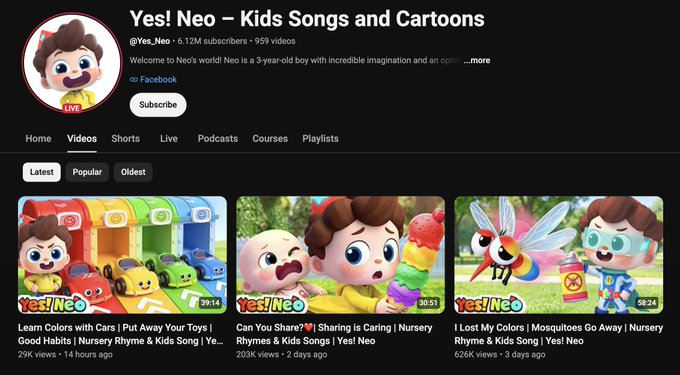
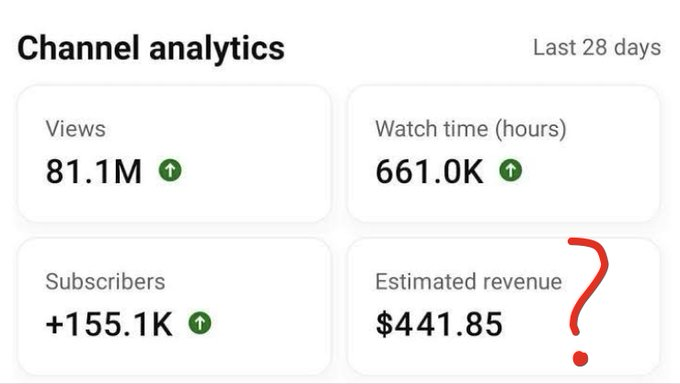
It isn’t a get-rich-quick scheme. Think of a kids’ channel like a vegetable garden, not a lottery ticket. You plant early, water consistently, and the harvest comes later than you’d like. Videos “made for kids” also earn less per view than most categories, because YouTube limits personalized ads on them. So the winning move is volume of loyal viewers plus more than one income stream. I’ll show you how.
2. Why I Chose Claude as My Creative Partner
What Claude does well
Claude is an AI assistant that’s great with words. It helped me brainstorm, outline, write, and polish. I used it the way a director uses a writers’ room: I set the vision, Claude generated options, and I picked the best ones.
What Claude can’t do
Let me be clear: Claude doesn’t make the video for you, and it doesn’t replace your judgment. It can’t see your audience’s faces or feel the difference between “cute” and “annoying.” You’re still the editor-in-chief.
Why that combination worked
Writing used to eat about 70% of my time. With Claude drafting and me refining, I could publish consistently without burning out. Consistency, more than any trick, is what builds a channel.
3. Finding a Niche That Parents Actually Trust
Start narrow, not wide
“Kids’ videos” is too broad. I picked one lane: short, gentle story-and-song videos built around everyday routines (brushing teeth, sharing, bedtime). A narrow niche is like a lemonade stand on the busiest corner. People know exactly what you sell.
Ask Claude to pressure-test your niche
I’d type something like: “I’m thinking about a channel for ages 3–5 about daily routines. What are the strengths and weaknesses of this niche? What do parents worry about?” Claude’s answers pushed me toward calmer pacing and clearer lessons.
Choose an age range and stick to it
A video for a 3-year-old and a 9-year-old are completely different animals. Pick one age range, then match your vocabulary, speed, and topics to it.
4. Researching Ideas Without Copying Anyone
Study the gaps, not the giants
I looked at what existing channels did well and, more importantly, what they skipped. Maybe nobody covered “visiting the doctor” in a gentle, non-scary way. That’s a gap.
Use Claude as a brainstorming partner
A prompt that worked for me: “Give me 30 original video ideas for 3–5 year olds about feelings, each with a one-sentence lesson.” I’d then cut the weak ones and twist the good ones into my own style.
Stay original
This matters for ethics and for business. YouTube penalizes channels that mass-produce near-identical or copied content, and parents notice knock-offs fast. Use ideas as sparks, not blueprints.
5. Writing Scripts with Claude, Step by Step
Step one: give Claude the full picture
The better your instructions, the better the draft. I always included the age range, video length, tone, the single lesson, and words to avoid.
Step two: ask for structure first
Before any full script, I’d request an outline: hook, three short scenes, a repeating chorus, a gentle ending. Fixing a skeleton is easier than fixing a finished body.
Step three: edit out loud
I read every script aloud. Anything that sounded stiff, I rewrote. Kids’ content should sound like a warm person talking, not a textbook.
Step four: add your human touch
Claude gave me solid drafts. My personality, little jokes, and real-life observations made them mine. Never publish a first draft untouched.
6. Turning Scripts into Videos Without a Big Budget
Keep the format simple
My early videos were simple illustrated scenes with voiceover and music. No complicated animation. Simple formats are faster to make, which means you can publish more often.
Tools I leaned on
I used basic design and editing tools to assemble visuals. Since my preference is Canva, I built most scenes and thumbnails there with its templates and drag-and-drop elements. Use whatever tool you’re comfortable with, as long as the final video looks clean and consistent.
Audio matters more than you think
Kids tolerate imperfect visuals far better than harsh audio. Use a clear, friendly voice and properly licensed music. Never grab a popular song and hope for the best, because copyright claims can wipe out your earnings.
7. Titles, Thumbnails, and Descriptions That Get Clicks
Titles: clear beats clever
Parents search for things like “calming bedtime song for toddlers.” I asked Claude for ten title options per video and picked the one that matched real search language.
Thumbnails: one idea, big and bright
A good thumbnail is like a shop window. One clear subject, bold colors, almost no text. Skip anything misleading, because clickbait gets you short-term views and long-term distrust.
Descriptions: help both people and search
I used Claude to draft short descriptions that said what the video was about, who it was for, and what kids would learn. Natural wording works better than stuffing in keywords.
8. The Rules You Must Follow (COPPA, “Made for Kids,” and More)
Mark your content correctly
This is the part people skip, and it can sink a channel. YouTube requires creators to tell it whether each video is “made for kids.” Getting this wrong can lead to penalties, and in the U.S. the child privacy law COPPA is serious business.
What “made for kids” changes
For those videos, comments are turned off, and personalized ads and some features are limited. That’s the reason earnings per view are lower, and why you need other income streams.
Avoid low-effort, mass-produced content
YouTube has tightened rules around repetitive, inauthentic content. If your channel looks like a factory of near-identical AI videos, expect trouble. Real value, real editing, and a real human behind it keep you safe.
Check the current rules yourself
Policies change. Before you publish, read YouTube’s current guidance on children’s content and monetization. I’m sharing my experience, not legal advice.
9. How I Grew from Zero to Monetized
The slow start
My first weeks were quiet. Really quiet. A few dozen views, mostly family. I nearly quit. Then I remembered the garden: roots grow before leaves show.
Consistency over perfection
I committed to a steady schedule and stuck to it. Claude helped me batch-write scripts, so I always had a backlog. Batching is the quiet superpower of every channel that survives.
Learning from the data
Each week I checked which videos held attention, then asked Claude to help me spot patterns: “Here are my top three videos by watch time. What do they have in common?” Songs with repeating choruses won. So I made more of them.
Reaching the monetization bar
YouTube sets thresholds for its Partner Program, based on subscribers and watch time or Shorts views. These requirements have changed over time, so check the current numbers on YouTube’s site. Once I crossed them, ad revenue began, slowly at first.
10. The Income Streams Behind My First $30K
Stream one: ad revenue
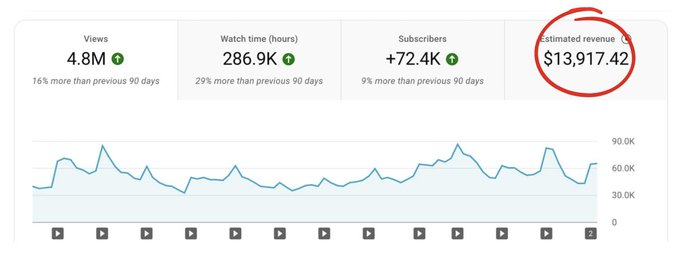
This was the foundation, but not the biggest piece, because of the lower rates on kids’ content I mentioned earlier.
Stream two: brand sponsorships
Once I had a trusted, engaged audience of parents, family-friendly brands became interested. Small sponsorships paid better than I expected, and they work best when the product truly fits your viewers.
Stream three: simple digital products
I made printable activity sheets and coloring pages tied to my videos, using Claude to draft activity ideas and Canva to design them. Parents loved having something to do after the video ended.
The big lesson
No single stream got me to $30K. The combination did. Think of it like a table: one leg wobbles, three legs stand strong.
11. Mistakes That Cost Me Time and Money
Publishing too fast, too early
My first few videos were rushed and it showed. A slower, higher-quality start would have saved me weeks of re-editing.
Ignoring the rules
Early on, I mislabeled a video’s audience setting. I caught it quickly, but it was a wake-up call to learn the policies before posting.
Trusting AI output blindly
Claude is smart, but it can still produce a line that’s off for a certain age group or a fact that needs checking. I now review every script for accuracy, safety, and tone. For children, that final human check is non-negotiable.
Chasing trends instead of building a brand
Jumping on every viral theme confused my audience. A clear identity, like a favorite storybook character, keeps families coming back.
12. A Simple 90-Day Plan You Can Copy
Days 1–30: foundation
Pick your niche and age range. Ask Claude for 30 ideas, choose 12, and write scripts for the first batch. Design your channel look and set up your tools.
Days 31–60: publish and learn
Post on a steady schedule. Check your analytics weekly. Ask Claude to help you spot patterns and improve your titles and hooks.
Days 61–90: expand
Double down on what works. Start a simple printable or activity product, and reach out to a few family-friendly brands once you have a bit of traction.
Keep your expectations honest
Results vary widely. Some creators grow faster, many slower. Treat this as a business you’re building, not a promise of income.

The steps, start to finish:
- Ask Claude for a batch of kids video ideas in your format, then pick one and have it write the full script and scene list.
- Describe each scene in plain English to your animation tool. It builds the characters, the colors, and the motion for you.
- Generate the voice and the song the same way.
- Stitch 6 or 7 clips into a 2 to 5 minute video in CapCut, add captions, export.
- Upload, mark it as made for kids, and schedule the next one.
Here is a prompt to run the writing part in one shot:
Act as a kids content creator for a faceless YouTube channel for toddlers
aged 2 to 5. Give me a full video plan for the topic: [e.g. a little fox
learns to share].

Include:
> a simple, gentle story with a clear positive lesson
> a scene-by-scene list, each scene with a one-line description of what
  is on screen and the exact narration or song words for it
> a short, catchy sing-along chorus that repeats
> a bright, friendly title and a thumbnail idea

Keep language very simple, warm, and safe for small children.
Use the same main character in every scene so the channel feels like a brand.
That gives you a complete, ready-to-build video in one message.
So, that’s how I made my first $30K on kids’ YouTube videos with Claude: a narrow niche, a steady schedule, an AI writing partner, strict attention to the rules, and several income streams instead of just one. Claude sped up the hardest part, writing, but the care, taste, and responsibility had to come from me. If you can bring those, you can absolutely make money in this space the right way. Start small, stay consistent, and put kids’ wellbeing first. The rest tends to follow.
Frequently Asked Questions (FAQs)
1. Can you really make money on kids’ YouTube with Claude?
Yes, it’s possible, but Claude is a helper, not a magic button. It can speed up ideas, outlines, and scripts, while you handle quality, safety, and strategy. Income depends on your niche, consistency, and how many revenue streams you build.
2. How much does Claude help with creating kids’ YouTube videos?
Claude is strongest on the writing side: brainstorming topics, drafting scripts and songs, writing titles and descriptions, and analyzing which videos perform best. You’ll still need tools for visuals, voiceover, and editing.
3. Is it safe and allowed to run a kids’ channel using AI-assisted scripts?
It can be, as long as you follow YouTube’s policies, correctly mark your videos as made for kids, use licensed assets, and add real human creativity and review. Avoid mass-producing repetitive content, and always check the current rules.
4. Why do kids’ videos earn less ad revenue?
Videos marked as made for kids have limits on personalized advertising and certain features. That lowers earnings per view, which is why creators combine ads with sponsorships and products like printables.
5. How long does it take to make money on kids’ YouTube?
It varies. Many creators spend several months building an audience before reaching YouTube’s monetization requirements, and longer before income becomes meaningful. A realistic plan and steady publishing matter more than speed.
A quick note: I wrote this in the first person as you requested, but the story details are illustrative. Before publishing, swap in your real numbers and experiences. Income claims presented as fact need to be true and provable (consumer-protection rules like the FTC’s apply), and readers trust specific, honest details far more than polished generic ones. I can also tailor it to your actual niche, or turn it into a Word doc or Claude Doc if you’d like.